
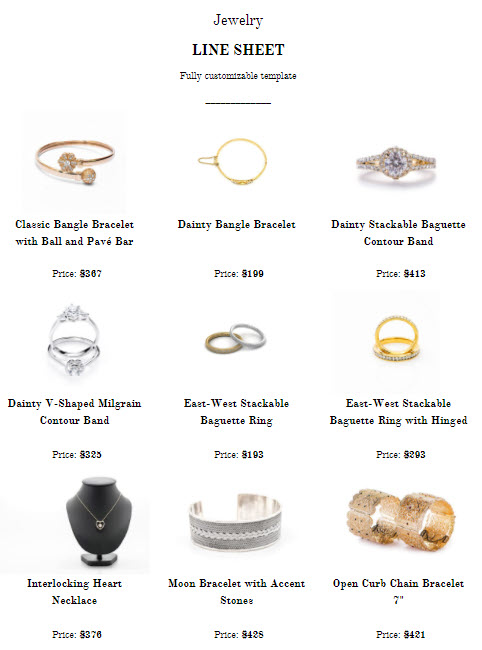
A line sheet (or price list) is the page buyers order from: the code, name and price of every product, often with a small image. Buyers keep it next to them when they reorder, so it matters more than the pretty pages.
In Catalog Machine a line sheet is a product list inside a catalog. It fills itself from your products, so a price you change is the price buyers see the next time you publish.
How do I add a line sheet?
In the Catalog Designer, open Layouts and pick Basic Price List or Minimalistic Price List. It lands on a new page with your products in a table.
Prefer to build it yourself? Drag the Product List element onto a page and pick the columns. Both ways are covered step by step in Create product and price lists.
How do I choose the products and columns?
Click Edit Product List above the page:
- Products: all your products, one category, or one collection. These follow your product list as it changes.
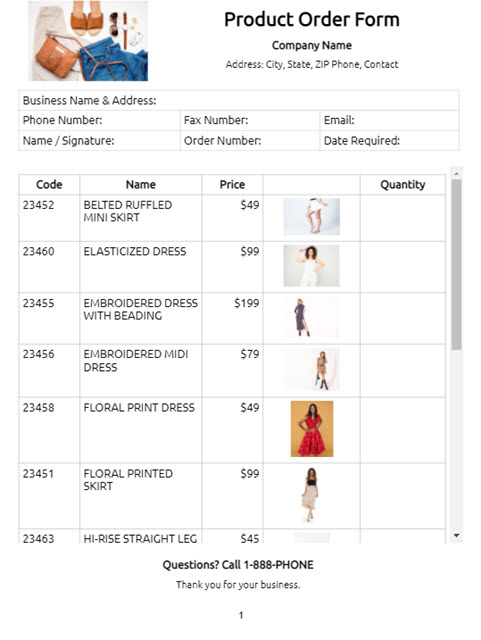
- Fields: Code, Name and Price are the usual three. Add Image for a thumbnail, and Quantity to turn the sheet into an order form.
- Design: turn on Separate Variant Rows when each size or color has its own code or price.
Can buyers order from it?
Yes, from the online version. Switch on Settings → Orders → Enable catalog orders, then add the Product Order Link field. Every row gets an Order link in the online catalog. Ordering works in the link, not in the PDF.
Prefer a printed order form? Add the Quantity field and the line sheet doubles as one that buyers fill in:
How do I send it?
Publish the catalog and send buyers the link: see Send your catalog to buyers. The PDF is in Share for buyers who want a file.
Questions
What is a line sheet? A list of every product with its code, name and wholesale price, often with a small image and minimum order quantities. Wholesale buyers order from it.
Is a line sheet the same as a price list? Mostly. A line sheet is the wholesale term and usually adds images and order details; a price list can be just codes and prices. In Catalog Machine both are a product list.
Do I have to update it by hand when prices change? No. The list reads from your products. Change a price and publish again.
More than one price?
Wholesale and retail, or a price per buyer group: see Different prices for different buyers.