
If you sell to the same buyers again and again, send them a link, not a file.
- It stays current. The link always shows your latest products and prices. Change a price, republish, and every buyer who has the link sees the new one. A PDF you sent last month still shows last month's prices.
- You can see when they open it. Views of your published catalogs show up in Analytics. A PDF sent by email tells you nothing.
- Buyers can order from it. Link the catalog to a Showroom and buyers can send you an order from it.
A PDF is still the right choice for a one-off job: a print run, a trade show handout, a single quote. The PDF of every published catalog is also in Share, so you can send both.
How do I publish a catalog?
In the Designer, click the status chip next to the catalog name (Draft), then Publish. Choose who can see it under Privacy:
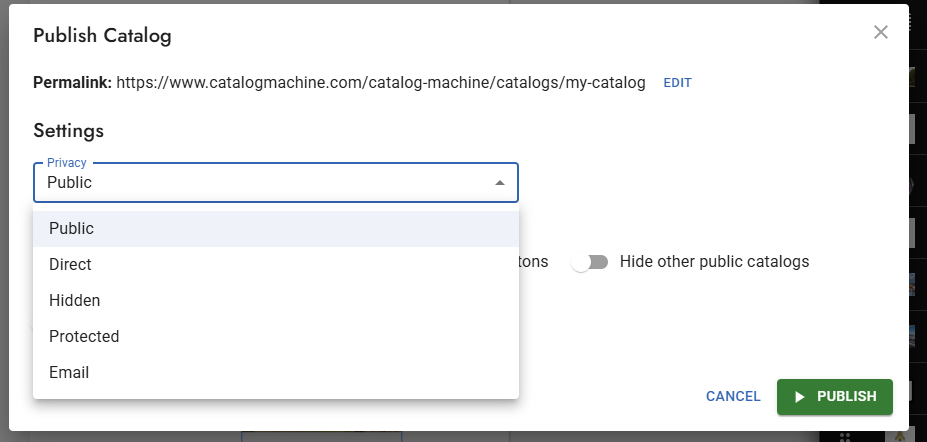
| Privacy | Who can open it |
|---|---|
| Public | Anyone. Listed and sent to search engines. |
| Direct | Anyone with the link. Listed only under your own catalog page. |
| Hidden | Anyone with the link. Not listed anywhere. |
| Protected (Pro) | Only people with the access code you set. |
| Email (Pro) | Anyone who enters their email first. |
For buyers, Hidden is the usual choice: anyone you send the link to can open it, and nobody else finds it. Use Protected when the prices must stay private.
How do I send the link?
Open Share in the Designer and copy the HTML link. Paste it into your email, WhatsApp or order confirmation. Send the same link every season; there is no need to send a new one after an update.
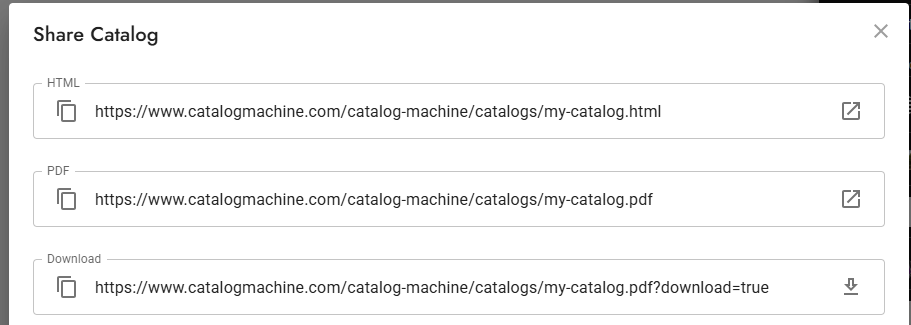
The PDF and Download links in the same dialog are there for buyers who want a file.
How do I keep it current?
Edit products or prices, then publish again (Update in the same dialog). The link does not change.
How do I see who is looking?
Open Analytics to see views of your catalogs by day. A catalog that buyers keep opening is the one worth keeping current.
Questions
Should I send buyers a PDF or a link? A link, if you will sell to them again: it always shows your current prices and you can see when it is opened. A PDF, for a one-off job or for print.
Does the link change when I update the catalog? No. Publish again and the same link shows the new version.
Can I stop people other than my buyers from seeing my prices? Yes. Choose Hidden so the catalog is not listed anywhere, or Protected (Pro) so it asks for an access code.
Related
- Make a line sheet: a page with the code, name and price of every product.
- Different prices for different buyers
- Online showroom: buyers browse your catalogs and send you an order.